Educational information, not medical advice. This article is written to help you understand common ear and hearing issues. It is not a substitute for professional diagnosis or treatment. If your symptoms are severe, sudden, or persistent, please consult a qualified doctor or audiologist. For urgent symptoms (sudden hearing loss, bleeding from the ear, severe pain with dizziness, or a head injury), seek medical care the same day.
How to actually use modern hearing aids day to day: adjust the volume, switch programs for noise or TV, use the phone app or a remote, and know which settings you can change yourself and which need your audiologist.
Modern hearing aids are controlled in four ways: a small button or rocker on the aid itself, a smartphone app, an optional handheld remote, and automatic adjustments the aid makes on its own. You can change the volume and switch listening programs yourself. What you cannot, and should not, change yourself is the underlying prescription, which is the amount of amplification set for each pitch. That is your audiologist's job, and at Prudent Hearing it is free for the life of the aid.
The four ways to control a modern hearing aid
- Button or rocker on the aid. A short press usually nudges the volume; a long press or a second button switches programs. Tiny in-the-ear models often have no button and rely on the app instead.
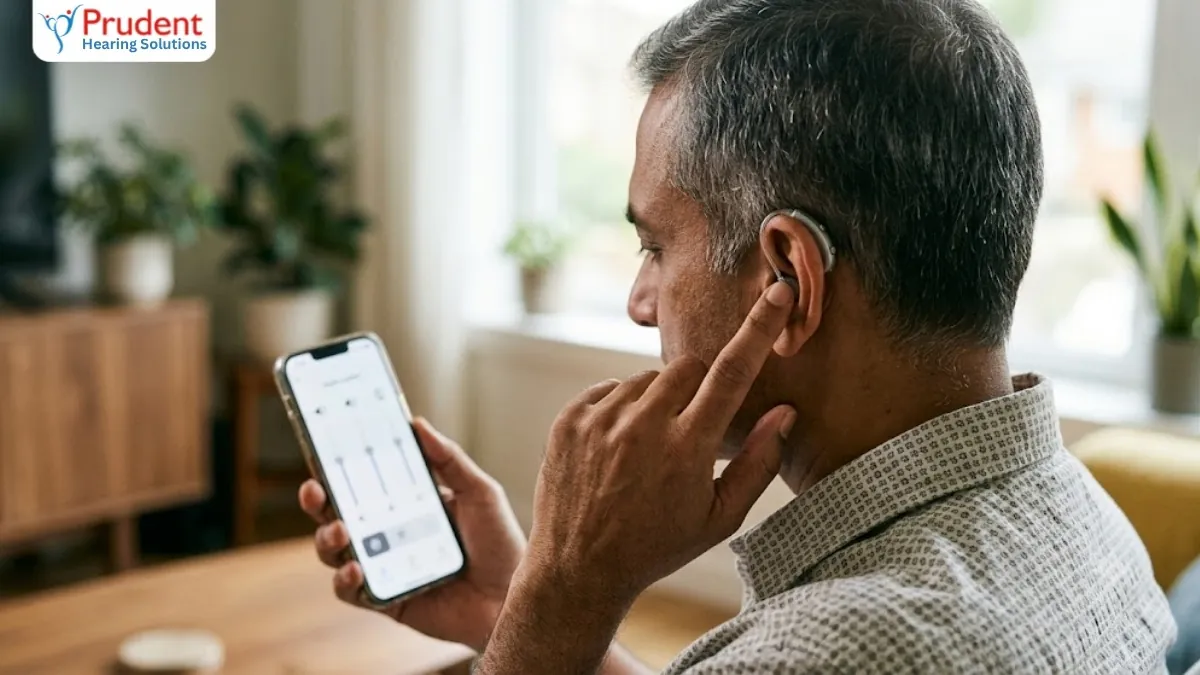
- Smartphone app. The fullest control: volume, programs, bass and treble balance, and a battery indicator, all from your phone.
- Handheld remote. A simple physical controller with clear buttons, useful if a phone or tiny controls are fiddly.
- Automatic. The aid detects quiet rooms, speech, noise or music and shifts settings by itself, so many people rarely touch anything.
Adjusting the volume
Volume is the setting you will use most. On the aid, a short press up or down steps the volume; you usually hear a beep at each step and a different tone at the maximum and minimum. In the app, a slider does the same and shows the level on screen.
Remember that turning the volume up does not fix clarity in noise; that is what the noise programs and a proper fitting are for. If you find yourself pushing the volume to maximum every day, that is a sign the aid needs re-tuning, not that you are doing something wrong. Book a free re-programming visit rather than living at full volume.
Switching programs for noise, TV and music
A program is a saved set of settings for a situation. Most people are set up with two to four: a general everyday program, a restaurant or noise program that narrows the microphones toward the person in front of you, a TV or streaming program, and sometimes a music or outdoor program.
You switch between them with the button or in the app. If your days include tricky settings, tell your audiologist so the right programs are loaded. Our guide to hearing aid features explained covers what each program actually does, and hearing better in noise has practical tips for restaurants and gatherings.
The smartphone app: what it can and cannot do
The app is the most powerful controller, and it is free. It handles volume, program switching, treble and bass balance, and often a 'find my hearing aids' locator and a remote-support link so your audiologist can fine-tune over the internet.
Each brand has its own app: Signia app, myPhonak, Oticon Companion, ReSound Smart 3D, Starkey and Widex apps; our hearing aid apps comparison shows what each one adds. What the app cannot do is rewrite your prescription safely; the sliders adjust within limits your audiologist set. For pairing and streaming, see our Bluetooth hearing aids guide and, for Signia specifically, the Signia app and phone connectivity.
Remote controls: who they suit
A handheld remote is worth asking for if a smartphone is not part of daily life, if small buttons on the aid are hard to feel, or if tremor or reduced dexterity makes fiddly controls frustrating. It is a common, sensible choice for older wearers. The remote does the everyday jobs, volume and program, with large clear buttons and nothing to log into. Ask about it at the fitting rather than struggling with controls that do not suit your hands.
What you can change yourself, and what needs your audiologist
Knowing the line saves a lot of frustration.
- You can change: volume, the active program, treble and bass balance in the app, and streaming settings.
- Your audiologist changes: the prescription (gain at each pitch), the number and type of programs, feedback and noise settings, and real-ear verified targets. At Prudent Hearing this fine-tuning is free for life, in the clinic or by remote support through the app.
If the aid sounds wrong, sharp, boomy, echoey or just not enough, do not keep nudging the volume. Those exact words help your audiologist adjust the fit, so note them and book a visit. First-time wearers will find tips for new hearing aid users useful while your brain adjusts over the first few weeks.
Common control problems and quick fixes
- Buttons do nothing: the aid may be muted or the battery low; try a fresh battery or a full charge.
- App will not connect: turn Bluetooth off and on, keep the phone within a metre during pairing, and check the aids are charged.
- Volume keeps resetting: many aids return to a default level each time you restart them; this is normal, and your audiologist can change the start-up level.
- One side sounds quieter: check the wax filter and dome first, then have it checked; do not simply crank that side up.
Whatever you are trying to adjust, you do not have to work it out alone. Prudent Hearing Solutions gives free lifetime programming at our clinics in Pune, Mumbai, Navi Mumbai, Delhi and Bengaluru, and remote fine-tuning through the app. Call +91 9429690093 or WhatsApp +91 8485096505, or book a free hearing test if you are still choosing an aid.
Continue reading
Frequently asked questions
How do I turn up the volume on my hearing aid?
Press the up side of the button or rocker on the aid, or move the volume slider in your hearing aid's phone app. Each step usually gives a small beep. If you find you need maximum volume every day, the aid needs re-tuning by an audiologist rather than more volume; at Prudent Hearing that adjustment is free for life.
Can I adjust my hearing aid settings myself?
You can adjust the volume, switch programs, and change the treble and bass balance in the app. You cannot safely rewrite the prescription, which is the amount of amplification set for each pitch; that is set and verified by your audiologist. The app sliders only move within the limits your audiologist has set.
What is a hearing aid program?
A program is a saved set of settings for a situation, such as a general everyday setting, a restaurant or noise setting, and a TV or streaming setting. You switch between them with the aid's button or in the app. Tell your audiologist about the situations you find hard so the right programs are loaded.
Do all hearing aids have a phone app?
Most modern digital hearing aids do, and it is free. Each brand has its own: Signia app, myPhonak, Oticon Companion, ReSound Smart 3D, and Starkey and Widex apps. Very basic or older aids may not connect, in which case a handheld remote does the same everyday jobs.
Is a hearing aid remote control better than the app?
Neither is better; they suit different people. The app does more and is free, and suits anyone comfortable with a smartphone. A handheld remote has large, clear physical buttons and nothing to log into, which many older wearers or people with reduced dexterity prefer. Ask for one at your fitting.
Why does my hearing aid volume reset when I restart it?
Many aids return to a default volume each time they power on, which is normal and protects your ears from a sudden loud start. If the default is too low or too high for you, your audiologist can change the start-up level.
Free consultation
Ready to hear the difference?
Book a free 45-minute hearing test at any Prudent Hearing clinic: no obligation, honest advice, expert audiologists.